


How Sparkuna for teachers works
Your students practise on Sparkuna. This page shows you their practice, so you can see who is working and what to teach again. Four steps.
-
1
Find your class
Your school’s classes are already here, from the school roster. Pick the grade in the dark bar at the top, then your class’s 🏫 tab.
Teaching a set that is not a school class, such as half of 7A? Press + New group, give it a name, then paste the list (names or school emails, one per line) and press Find these students, or tick the names. Press Save group.
Students never see classes or groups here.
-
2
Open your class and read the five boxes
Pick the grade, then your class or group tab (or Whole grade for everyone in the grade at your school).
The five boxes show the week at a glance: how many students practised, how many careful runs, how many questions and the % right. Use the subject tabs and This week / Last 4 weeks to look closer.
-
3
See what needs you
- Worth a look: a chapter the group finds hard, and the wrong answer most students picked. That wrong answer usually shows the misconception: ask the class why someone might choose it.
- Who may need a word: students who rush, find one chapter hard or often press “I don’t know this yet”. A nudge for you, never a mark.
- Send a cheer: Sparkuna names the students who worked hardest. One click sends them a short “well done” from you.
-
4
Set work, then come back to see who did it
Set a chapter, or only some of its topics, on Assign Practice (the Assign practice → button). It shows here under Work you set, with how many students started and finished.
The Students table on Progress has one row per student, with a column for each piece of work.
Your work and your cheers, on their home page
Students see the work you set and your cheers at the top of their Sparkuna home page, with your name. One tap starts the practice.
Nothing else from this page reaches them: your groups, the numbers and the lists are only for you. Take the Sparkuna tour →
Words on this page
- Group
- Your list of students for one class. Students never see it.
- Careful run
- A practice run of 5 or more questions done without rushing, right or wrong. It shows effort, not marks.
- % right
- Of all the answers in the week (or the last 4 weeks) you picked.
- Questions to look at
- The questions your students most often answered wrong, and the wrong answer they chose most.
- Reading tab
- Which books (Grades 1-6) or Morning Reading texts (Grades 7-12) each student has read to the end, and how they did on the quizzes.
Good to know
- Sparkuna is practice, not a test. Nothing here is a grade: use it to see effort and to choose what to teach again.
- Work you set is a suggestion. It gives no extra points, and students are never punished for skipping it.
- You see your own school only. The numbers update every few minutes; press ↻ to refresh.
- Your school leaders (principal and coordinators) see your groups, the work you set and your live classes in Academic Hub, to support you, never to appraise you.
- For subject teachers and subject leaders.
- Teachers Hub counts which Sparkuna pages you open and for how long, so Eduversal can make them easier. Your school leaders do not see it.
How to use this page in a lesson
Three things for the class screen, made from your students’ practice on Sparkuna: a short video, the questions they got wrong, and a Friday talk. Each takes 5 to 10 minutes of a lesson.
Three short films
English voice-over and captions. All the teacher films are in Video tutorials →
Show a two-minute video about a topic your class finds hard.
The questions your students most often got wrong, for a class talk.
Questions about the week’s reading for a short class talk.
-
1
Show a Quick Fix video
Pick the grade and your class at the top. Each video is about two minutes long and is about a topic Sparkuna students often get wrong. A gold line, Your class finds this chapter hard, marks the videos your class needs most.
Press ▶ Show in class. The video opens large, with an English voice and captions. Press Full screen, and pause before “Your turn” so the class answers first. The class screen is another device? 📺 Send to a class screen gives a code to type at sparkuna.com/screen; you then play and pause it from your laptop.
After the video, Set this chapter… sets the topic as practice for the class.
-
2
Talk through a question many got wrong
Questions to look at lists the questions your students most often answered wrong (once 3 or more students have answered one), with the wrong answer most picked and the right answer.
- Write the question on the board and let the class try it again.
- Ask: “Why might someone choose −10?” Let students explain the mistake.
- Then work it out together.
📺 Send these to a class screen shows the questions there one at a time; you reveal the most picked wrong answer and the right one. No student’s name is shown here or there.
-
3
Friday class talk (Grades 7-12)
For the homeroom teacher, after Friday’s Morning Reading. Press the Reading tab at the top, then pick the week. You get a few questions about the week’s texts.
Start with one question; you rarely need all of them. There is no right answer and nothing to mark, and nobody has to speak. Copy the questions puts them on your clipboard for a slide or a chat, and 📺 Send to a class screen shows them there one at a time.
Where do these come from?
From your students’ practice on Sparkuna, for the grade, the class or group and the subject you picked at the top. Pick another subject tab to see that subject’s videos and questions. Change the class, and the questions change too.
Good to know
- A card shows only when it has something in it. No video for this grade and subject yet, or no question answered by 3 students yet? Then that card is not here.
- Students also see Quick Fix videos on their own: after a wrong answer on that topic, and on Practice.
- Students never see the Friday talk questions or this page.
- Want the whole class to answer on their own devices? Live Class asks a chapter’s questions on the class screen.
Start here: Sparkuna in your next lesson
Pick one. Each takes a few minutes, and the first two need no setting up.
- 📺 Run a short quiz in classLive Class: students join on their phones or laptops with a code, or the class plays together on the board.Start a Live Class
- 🖨 Print a worksheetA topic's Sparkuna questions on paper, easy ones first, with the answer key.Choose a topic
- 📌 Set practice for one classOpen your class’s 🏫 tab above and choose a chapter on Assign Practice; for a set that is not a school class, make a group. Students see it on their home page.

Work you set
Worth a look
Chapters this group finds hard, with the question missed most. Talk it through in class, then suggest the chapter if you like.
How a chapter gets here
3 or more students, 15 or more answers, under 60% right. A week after you suggest a chapter, “Since you suggested it” below shows how the group did.
Since you suggested it
% right before and after you suggested a chapter (last 5 weeks). Whole group only, never a student, never a mark.
How it is worked out
Each student's first try only, and after the suggestion only on questions they had not met before, so a remembered answer does not count. It shows what changed, not why: your lessons, other homework and harder questions all count too.
Friday class talk
For the homeroom teacher, after Friday's reading: 5 to 10 minutes. There is no right answer and nothing to mark. Never make anyone speak. Students never see these questions on Sparkuna; you may show them one at a time on the class screen.
Workshop challenge
In the Sparkuna Workshop students build with blocks. Set a building challenge for one of your groups: its students see it on their home page and in the Workshop, and Sparkuna checks their build and gives a tip when something is missing. Each one practises a maths idea (area, symmetry, volume, ratio, patterns). A suggestion, never a grade.
Sim Lab
Students use real science and maths simulations (PhET, GeoGebra, Concord Consortium). They predict first, test it in the simulation, then answer two check questions. The first finish of each simulation earns 5 points (up to 4 a day). Below is each simulation of this grade: how many students finished it, how many predicted right, and how many checks they got right. When you pick a chapter on Assign Practice, its simulations are named there too. A picture of use, never a grade.
📷 New, Grades 7–9 Mathematics: Sparkuna's own 3D simulations (nets, prisms, solids, symmetry, Borobudur) can stand on a card through a phone or tablet camera. Each shape has its own card: print the cards (two A4 pages) and lay one on each desk. Students open the simulation in Sim Lab and tap 📷 See it on a card; their answers count as usual.
🧮 Maths tools for your class, Grades 1–6: a bead rack, base-ten blocks, a geoboard and pattern blocks. Set a task, show it on the class screen, or give students the link. The tool checks each answer, and "find different ways" tasks list every way a child finds.
Students
Quick Fix videos
Two-minute videos on the topics Sparkuna students miss most, with an English voice and captions. A student sees one after a wrong answer on that topic, and on Practice. They work well in class too: show one on the class screen, talk about the trap it shows, then let students try the topic on Sparkuna.
Who may need a word
Students who seem stuck, each with a reason you can check in Progress. A nudge for you, never a mark; students never see this list.
Send a cheer
A short “well done” with your name on the student’s Sparkuna home page. No points, never a mark, and students who hear from their teacher come back more often.
Who needs what next
Each learning objective, student by student
For every Cambridge learning objective in this grade’s questions: who is secure (right on their own, and again on a later day), who to check again on another day, who has managed only with help (hints, a live class, a lesson), and who may need a worked example. Where students share the same mistake, the card names it and gives a short way to reteach it. Built each night from students’ own answers. A guide for your teaching, never a mark; students never see it.
Topic map
The Cambridge syllabus, topic area by topic area
Each cell shows how a student did in one area of the syllabus, from both school years (for Grade 10, the Grade 9 topics too). It reads their last 10 answers in each topic they tried. Students see the same map on Sparkuna Exam prep. Use it to find the topics a student has missed, for example after joining from another school. It is practice, not a grade.
Topics the class finds hard
Tried by at least 3 students, lowest % right first.
Primary Checkpoint mock papers
Grade 6 students can do whole Checkpoint-style papers on Sparkuna (Exam prep → Primary Checkpoint): Mock 1-5 and Review 1-5, two papers each, once per paper. Each cell is the right answers out of the paper's questions, the same numbers the student sees. Practice, not a Checkpoint score.
Papers count here from any date, not only this week or the last 4 weeks. “…” = started, not finished yet.
Practice tests (exam mode)
Tests count here from any date. “…” = started, not finished yet. Practice on Sparkuna, not an exam score.
Students
Read-aloud recordings
Students record themselves reading a book aloud at the end of the book. Sparkuna keeps each child's first recording of a book next to the latest two, so you can hear how their reading has changed. Only you, the school's teachers and leaders, and the child's family can listen. Recordings are deleted at the end of the school year.
Writing check
A few times a year students write one short piece in 20 minutes, on one of two questions, with copy and paste turned off. Sparkuna gives each student one thing that works, one thing to work on and one next step. Here you read what they wrote and may give a level from 1 to 4; school leaders see only class counts, never the writing. Everything is deleted at the end of the school year.
IELTS Writing
Students in Grades 9-12 write IELTS-style answers on Sparkuna: Task 1 describes a chart or table (150+ words, 20 minutes), Task 2 is an essay (250+ words, 40 minutes). Each answer gets an automatic estimate first: a band for each of the four criteria and some feedback. Read the answer, keep or change any band, and confirm. Your bands are the record: the student then sees “Checked by your teacher”. Everything is deleted at the end of the school year.
Sparkuna credits
Students practise on Sparkuna for free. Credits pay for practice past the free use: a practice test after the 3 free ones a school year for each subject, and an IELTS Writing answer after the 2 free ones a day. Give credits to the students who want more practice; families can also add credits from the student’s profile. Practice with credits earns no points, so it never changes the leaderboards.
Test mode: payments go to the Midtrans sandbox, no real money moves, and credits can only go to test accounts.
Word Cards
Students learn English words on Sparkuna: a word of the day, cards that come back after 1, 3, 7, 14 and 30 days, and a short check on each card. The word check estimates how many common English words (A1 to C1) a student knows. It is a practice estimate the student takes on their own, not a test score. A good start for a talk about reading more.
Lab Valley
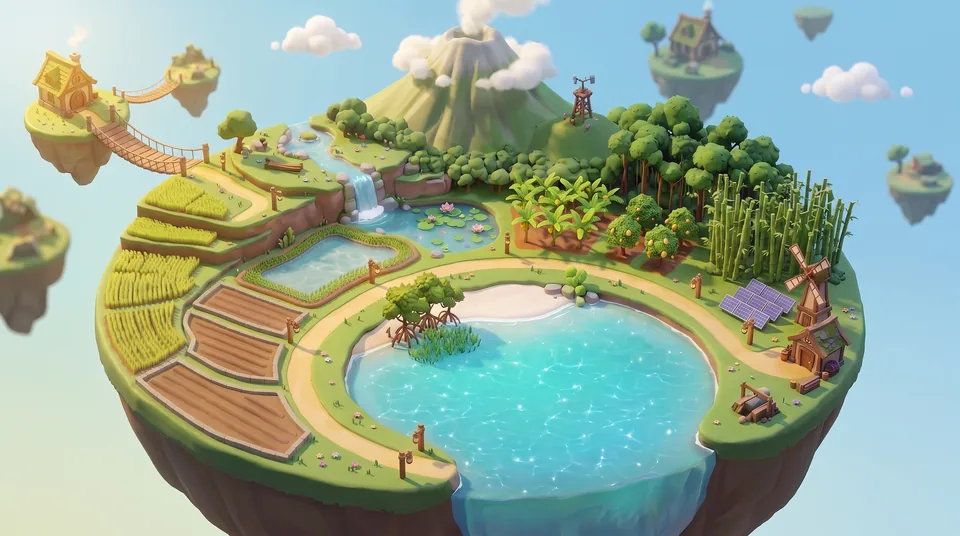
Hands-on science investigations on each student's island. They come one after another: finishing one opens the next. No points, no marks.
Mina Padi Rescue
A science investigation in the rice-fish paddy of each student's island. Students predict how many fish will do best, test 3, 5 and 8 fish twice each, work out the means, make ONE change (rice or fresh water), then write their advice with their own trials as evidence. Sparkuna runs every trial and checks the advice against the student's own results. No points, no marks.
The group's students see it on their Sparkuna home page. While it is open they can start it even if the rice-fish paddy on their island is not open yet, so the whole class can do it together. Once a student starts, it stays open for them.
Chapters practised
Most practised first

Questions to look at
Answered by 3+ students · in the most-practised chapters
The most common wrong answer usually shows the misconception. These are good starters for a class discussion.
Problem-solving strategies
Some Math questions ask for a way of thinking as well as a topic: try a number and check it, find the mistake in someone's working, test whether a rule is always true. Cambridge calls this Thinking and Working Mathematically. Here is how this group does on each kind.
A question to talk through
For each strategy under 60% right: the question missed most often (3+ answers), with a question to ask the class.
About 1 in 10 Math questions in Grades 4-9 carry a strategy; most questions practise a topic only. Codes are Cambridge's: .
Friendly matches
After a careful practice run, a student can challenge a classmate of the same grade to the same 5 questions on that topic. Only right answers count, never speed. Here is who has played.
Counts only: who won a match is not shown here. "Started" = matches the student sent. Match questions also count in the practice numbers on the other cards.
Sparkuna events
Every two weeks Sparkuna runs a Comic Contest, and every month a Reading Bingo card. A student's comic reaches your school's gallery only when a teacher shows it here. There are no votes and nobody is ranked: everyone who enters gets an event stamp.
More for your classes
Everything is also in the menus at the top